
Quick answer: Narrowband astrophotography uses filters that pass only a few nanometers around the emission lines of hydrogen-alpha (656.3 nm), doubly ionized oxygen (500.7 nm) and ionized sulfur (about 672 nm). Because almost everything else is blocked, including most light pollution and moonlight, you can image emission nebulae from city skies. Mono cameras shoot each filter separately; color cameras use dual-band Ha/OIII filters. The channels are then mapped to color, most often as SHO (Hubble palette) or HOO.
As an Amazon Associate, Midwest Astronomy earns from qualifying purchases.
Emission nebulae, supernova remnants and planetary nebulae do not glow across the whole spectrum the way stars and galaxies do. Their gas is excited by ultraviolet light or shock waves and emits at a handful of specific wavelengths. A narrowband filter takes advantage of that: it transmits a thin slice of spectrum around one emission line and rejects the rest. Skyglow from streetlights, airglow and moonlight are spread across the spectrum, so a 3-7 nm filter throws away nearly all of them while keeping most of the nebula’s signal. That is why narrowband is the standard approach for imagers under suburban and urban skies, and why it is one of the few kinds of deep-sky imaging that still works with a bright Moon in the sky.
The three emission lines
| Line | Wavelength | Color to the eye | What it traces | Typical strength |
|---|---|---|---|---|
| H-alpha (Ha) | 656.3 nm | Deep red | Ionized hydrogen, the bulk of most nebulae | Strongest by far |
| OIII | 500.7 nm (and 495.9 nm) | Teal / blue-green | Doubly ionized oxygen in hotter, high-energy regions | Moderate; strong in planetary nebulae and some SNRs |
| SII | 671.6 / 673.1 nm | Deep red | Ionized sulfur, often at shock fronts and ionization edges | Usually the faintest |
Two practical consequences follow from that table. First, SII sits only about 15 nm from Ha, so both fall on the red pixels of a color sensor. A one-shot color camera with a dual-band filter can separate Ha from OIII, but it cannot cleanly separate SII from Ha. Second, the lines differ hugely in strength. On many targets Ha is several times brighter than OIII or SII, which shapes how you split your imaging time and why unbalanced Hubble-palette images come out green.
Mono camera with filters vs color camera with a dual-band filter
Monochrome + narrowband filters
A monochrome camera behind individual Ha, OIII and SII filters uses every pixel for each line. That is the most efficient and flexible route: you can shoot any palette, add more time to the weakest channel, and combine with RGB star data. The cost is a filter wheel (or manual changes), three sets of calibration frames, and more processing steps. Our mono vs color astro camera deep dive covers the full trade-off.
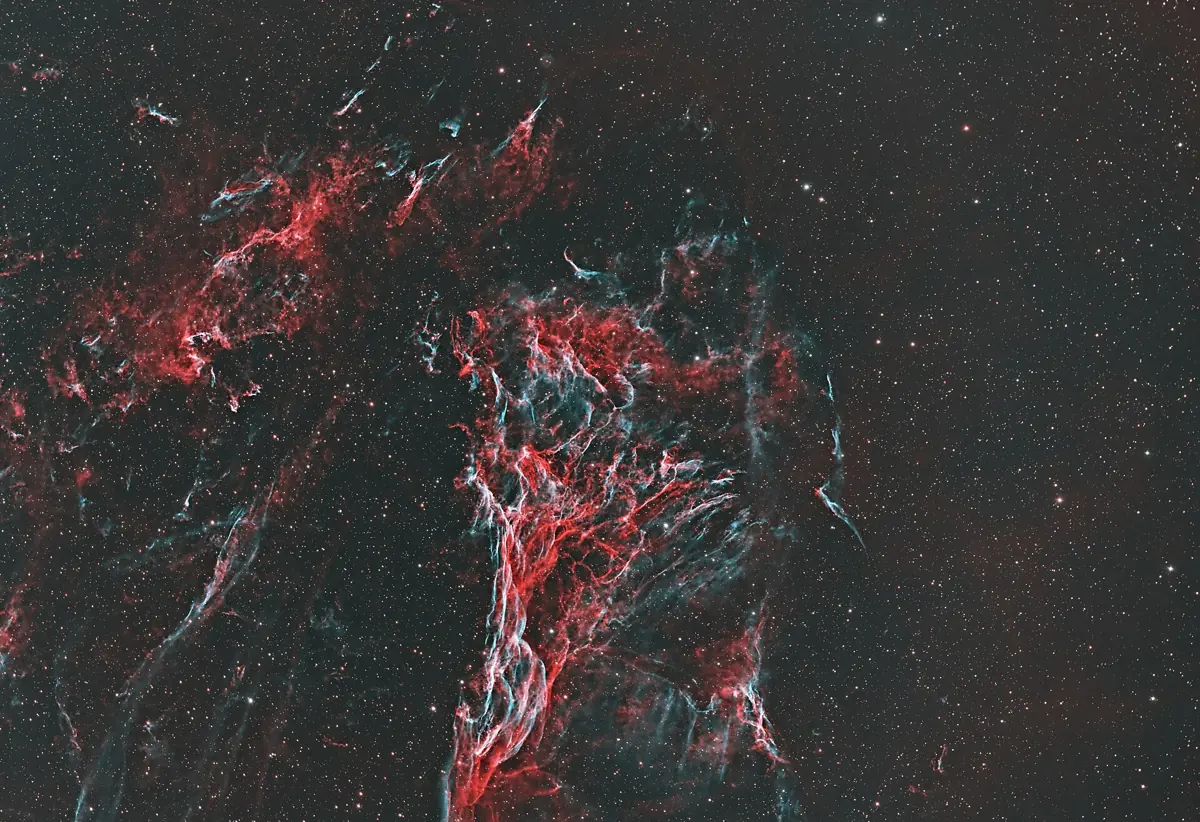
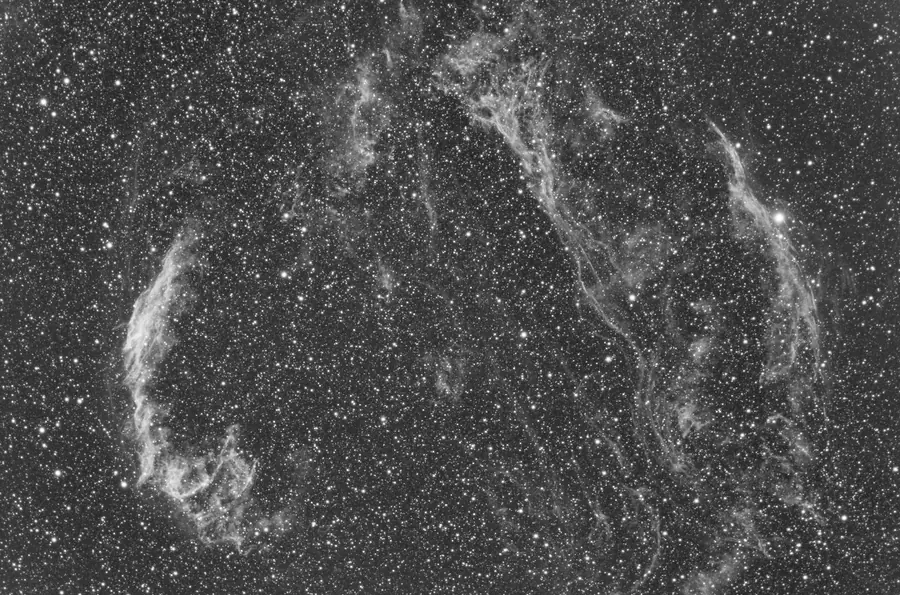
For a real-world example, the Veil Nebula image in our post First Pictures with a Monochrome Camera was shot with a monochrome ASI2600MM Pro behind Optolong 7 nm Ha and 6.5 nm SII and OIII filters: 62 x 360 s of Ha, 60 x 360 s of OIII and 58 x 360 s of SII, 18 hours over four nights under Bortle 7 skies, with the filter changing after every exposure to keep the backgrounds consistent as a bright Moon rose.
One-shot color + dual-band filter
Dual-band filters pass two narrow windows, around Ha and OIII, in one piece of glass, so a color camera or modified DSLR captures both lines in every frame. Optolong’s specifications for its popular options, as of November 2026:
| Filter | Passbands | Bandwidth (FWHM) | Intended optics |
|---|---|---|---|
| Optolong L-eXtreme | Ha + OIII | 7 nm each | General use, including fairly fast systems |
| Optolong L-eXtreme F2 | Ha 656.28 + OIII 500.7 nm | 7 nm each | Designed for f/2 to f/3.3 (RASA, HyperStar) |
| Optolong L-Ultimate | Ha 656.3 + OIII 500.7 nm | 3 nm each | Slower systems; Optolong says it is not suited to fast focal ratios |
In processing you can treat the dual-band data as a normal color image, or split it. Siril’s Extract Ha/OIII function (Siril 1.4.5 is the current stable release) creates an Ha image from the red pixels and an OIII image from the green and blue pixels; by default the Ha image is half the width and height of the OIII image, and a resample option or the seqextract_HaOIII command with drizzle matches them. You then stack each channel and combine them as HOO.
The catch is efficiency. Only one pixel in four is red, so Ha is collected with a quarter of the sensor, and the Bayer filters themselves absorb some light. The post above includes a useful side-by-side: a single 6-minute Ha frame from the mono ASI2600MM Pro next to a single 6-minute L-eXtreme frame from a color ASI533MC Pro on the same night, and the mono frame is visibly smoother. Dual-band OSC is still an excellent, lower-cost way to start.
Choosing a bandwidth: 3 nm vs 5-7 nm vs 12 nm
- Narrower (3 nm) gives darker backgrounds, more contrast under light pollution and moonlight, and smaller star halos. It needs longer exposures and a filter matched to your focal ratio.
- 5-7 nm is the common middle ground. Cheaper, more forgiving at faster f-ratios, and easier to work with when guiding or focusing.
- 12 nm and wider passes more light pollution but more signal too; these are mostly entry options or tri-band “enhance” filters.
Watch your focal ratio. Light reaches the filter at steeper angles in fast optics, which shifts an interference filter’s passband toward shorter wavelengths. Very narrow filters on very fast scopes can lose part of the line. That is why manufacturers sell “high-speed” versions such as the L-eXtreme F2 for f/2-f/3.3 systems.
Mind the size. Use filters large enough for your sensor and spacing. The image above used 36 mm unmounted filters with an APS-C sensor; smaller 1.25-inch filters can vignette large sensors.
How to shoot narrowband: step by step
- Choose an emission target. Good narrowband targets include the Veil, North America and Pelican, Heart and Soul, Crescent, Rosette, Jellyfish, Pacman, Eagle and Lagoon nebulae. Galaxies, reflection nebulae and star clusters are broadband targets and gain little from narrowband filters.
- Focus per filter. Even good refractors focus slightly differently in red and teal. Autofocus after every filter change, or save focuser offsets per filter in your capture software.
- Pick exposure length. Narrowband subs are longer than broadband subs because so little sky background reaches the sensor; 180-600 s per sub is typical with a cooled camera, depending on focal ratio, bandwidth and your mount’s guiding. Our PHD2 guiding tutorial helps make long subs reliable.
- Split time toward the weak channels. A common starting point is to give OIII and SII as much time as Ha, or more, because they are fainter. For HOO, many imagers give OIII more total time than Ha.
- Plan around the Moon. Ha is the most forgiving channel under moonlight; OIII sits closer to the blue end of the spectrum, where scattered moonlight in the atmosphere is stronger, so it suffers most. Shoot Ha near full Moon and OIII on darker nights when you can.
- Dither and shoot calibration frames for every filter. Flats are filter-specific because dust shadows and vignetting change with each filter. See our calibration frames guide.
- Collect enough total integration. Narrowband rewards patience. Several hours per channel is normal for fainter targets.
Building color: SHO, HOO and other palettes
Narrowband images are false color: you decide which channel goes to red, green and blue.
| Palette | Red | Green | Blue | Look |
|---|---|---|---|---|
| SHO (Hubble palette) | SII | Ha | OIII | Gold and blue after balancing; green-dominant before |
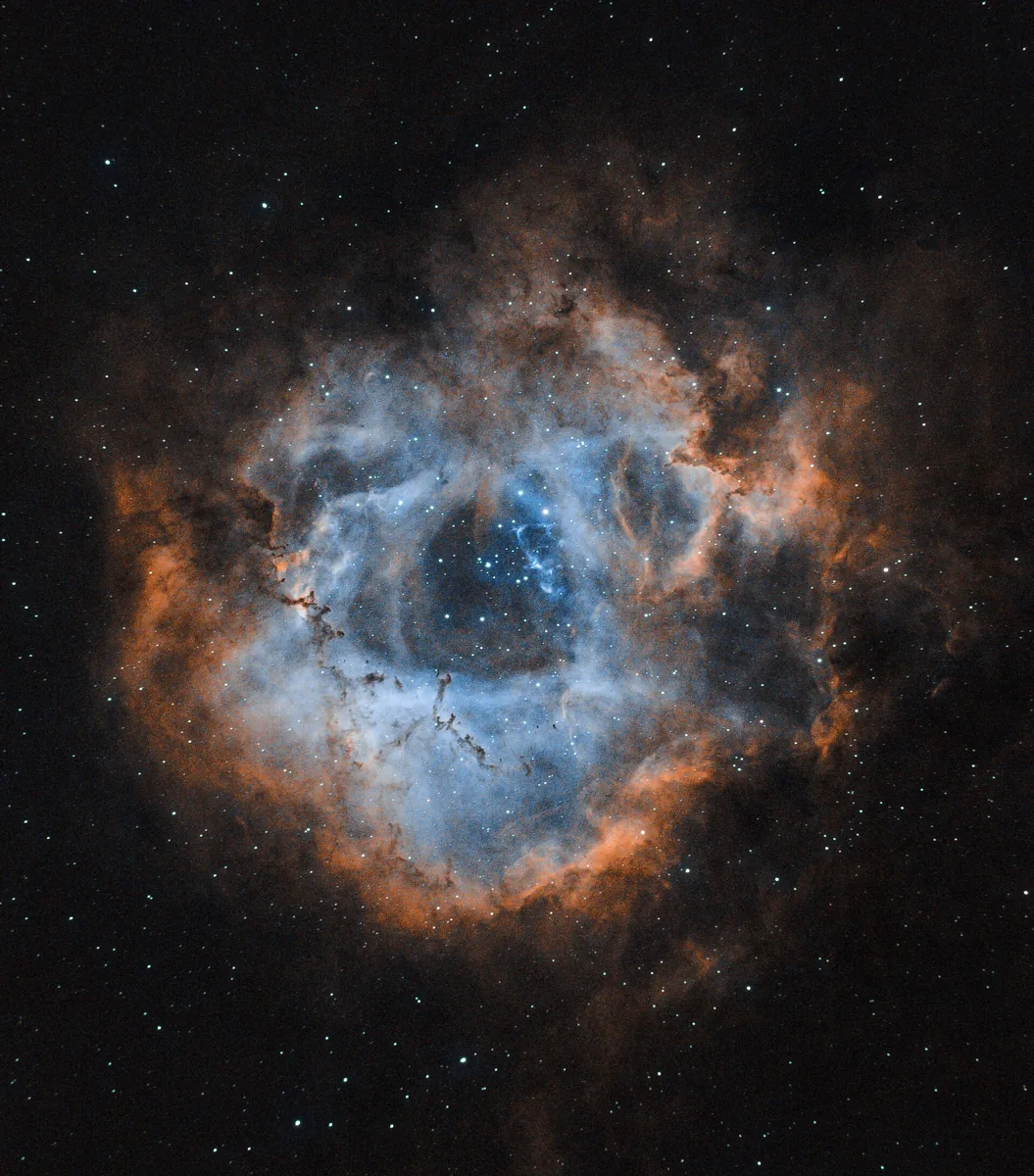
| HOO (bicolor) | Ha | OIII | OIII | Red and teal, close to natural nebula colors |
| HSO | Ha | SII | OIII | Alternative mapping with redder hydrogen |
| Ha + RGB | Ha blended into red (and luminance) | G | B | Natural color with boosted hydrogen detail |
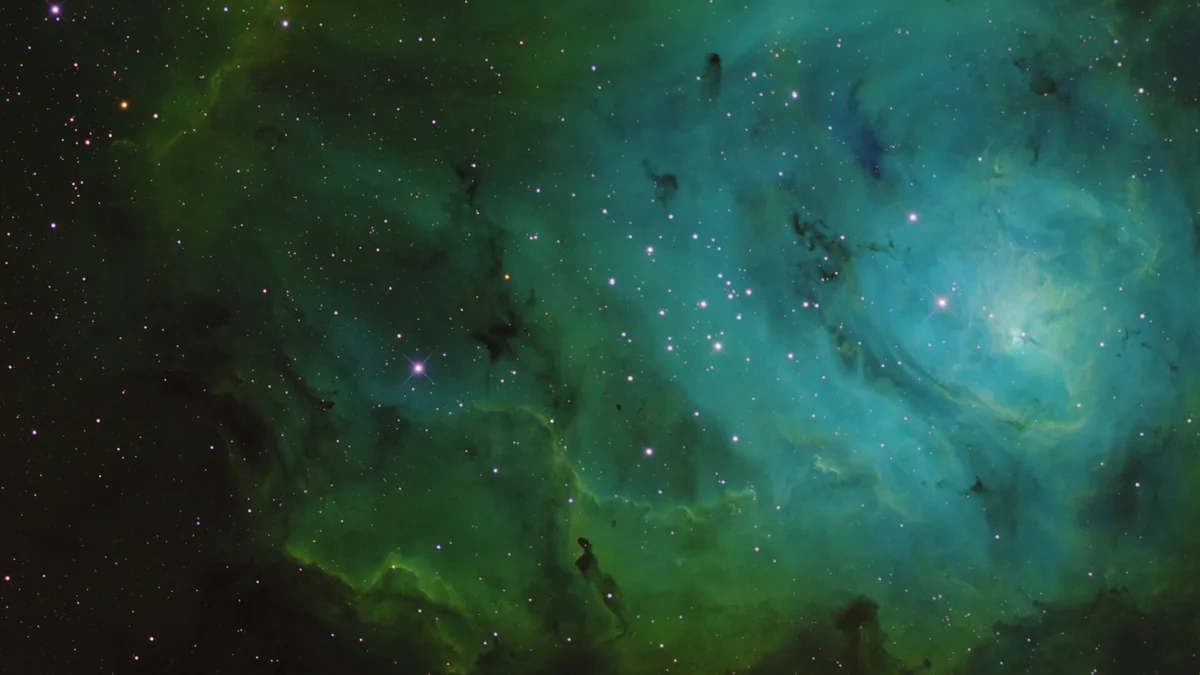
Why raw SHO comes out green. Ha goes into green, and Ha is usually the strongest signal, so a straight channel mapping is dominated by green. The fix is to balance the channels during processing: stretch each channel to similar brightness before combining, reduce green with tools such as SCNR or channel-specific curves, and shift hue so hydrogen-rich areas read gold and oxygen-rich areas read blue.
A simple processing order:
- Calibrate, register and stack each channel separately (or extract Ha and OIII from dual-band OSC data).
- Register the stacked channels to each other and crop the edges.
- Remove gradients from each channel while it is still linear.
- Combine channels into the palette you want. Some imagers stretch first and combine afterward for easier balancing.
- Remove the green cast in SHO, adjust hue and saturation, and reduce noise in the weaker OIII and SII channels.
- Fix star color. Narrowband stars often show magenta halos or odd colors; many imagers remove stars with a star-removal tool, process the nebula, then add back stars from short RGB exposures or reduce star color saturation.
Siril, PixInsight and Astro Pixel Processor all handle channel combination; our stacking software comparison explains where each fits.
What you need to get started
- A cooled mono camera and filter wheel if you plan to commit to narrowband: a 7 nm narrowband filter set or 3 nm filters plus an electronic filter wheel.
- A color camera or astro-modified DSLR with a dual-band filter for the lowest-cost route.
- A tracking mount and guiding, because narrowband subs are long.
- Autofocus or a Bahtinov mask, since focus shifts between filters.
Frequently asked questions
Yes. Narrowband is the most effective way to image emission nebulae from suburban and city skies because the filters block most artificial light while passing the nebula's emission lines. It does not help galaxies, reflection nebulae or star clusters, which emit across the whole spectrum.
Yes, with a dual-band Ha/OIII filter. You can process the result as color or extract separate Ha and OIII channels in software such as Siril and combine them as HOO. A color sensor cannot cleanly separate SII from Ha, so a true SHO image needs a monochrome camera or a separate SII-specific workflow.
Yes, especially H-alpha, which is the least affected by moonlight. Narrower filters (3 nm) cope better than wider ones. OIII is the most affected, so save OIII for darker nights if you can and keep some angular distance between the target and the Moon.
In SHO, H-alpha is mapped to green, and H-alpha is usually much stronger than SII and OIII, so an unbalanced combination is dominated by green. Balance the channel stretches before combining, then reduce green with SCNR or curves and adjust hue.
With a cooled camera and a guided mount, 180 to 600 seconds per sub is typical, depending on your focal ratio, filter bandwidth and sky. Total integration matters more than sub length: several hours per channel is normal for faint targets.
SHO maps sulfur to red, hydrogen to green and oxygen to blue, producing the gold and blue Hubble look after balancing. HOO maps hydrogen to red and oxygen to green and blue, which needs only two filters and gives a red-and-teal look closer to the nebula's natural colors.