
Quick answer: Plate solving identifies exactly where your camera is pointing by detecting the stars in an image and matching their pattern to a star catalog. In seconds it returns the center coordinates, image scale and rotation, so capture software can sync the mount and re-center your target, usually to within an arcminute. For most rigs, install the free ASTAP solver with a star database that suits your field of view, enter the correct focal length and pixel size, and let your capture software do the rest.
As an Amazon Associate, Midwest Astronomy earns from qualifying purchases.
Plate solving is the single feature that changed amateur imaging workflows the most in the last decade. It replaced star-hopping, multi-star alignments and the guesswork of “is the target actually in the frame?” with a measurement. It also underpins polar alignment tools, meridian-flip re-centering, mosaic planning and the color calibration tools in modern processing software.
This guide explains what a solver is doing, compares the main solvers, walks through setup and lists the fixes that cure most failed solves. Version numbers are as of November 2026: ASTAP v2026.11.12 and Siril 1.4.5.
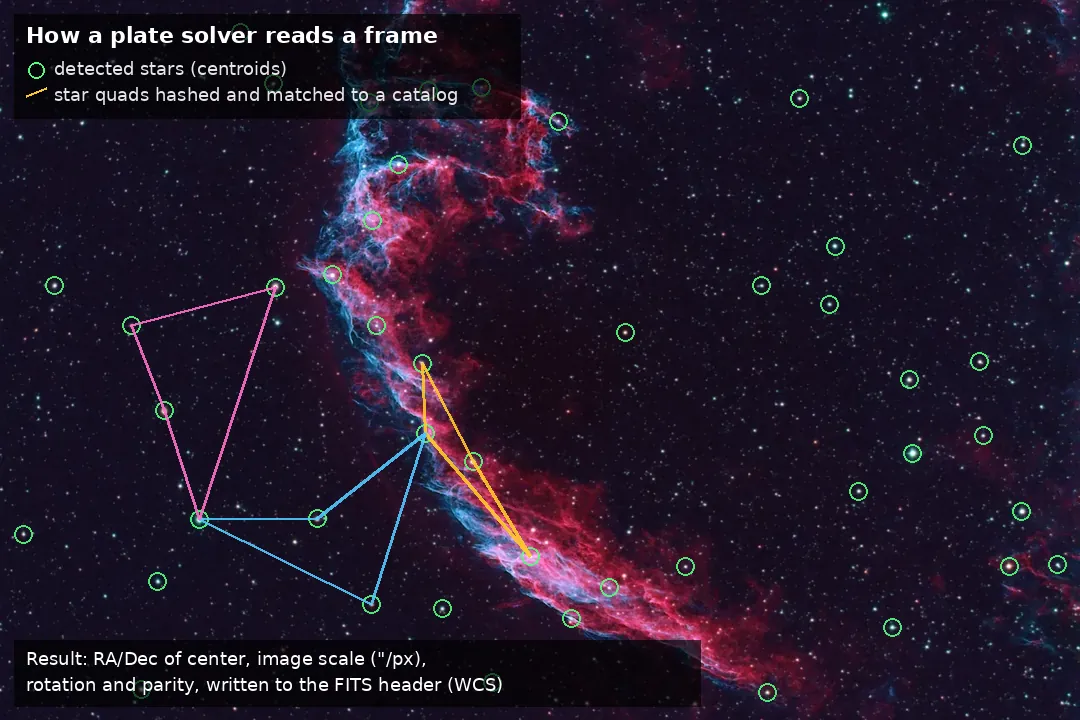
What plate solving actually does
A plate solver takes an image and answers four questions:
- Where is the center of the frame in right ascension and declination?
- What is the image scale, in arcseconds per pixel?
- What is the rotation, the angle between the image’s up direction and celestial north?
- Is the image mirrored (its parity)?
The answer is called a WCS (World Coordinate System) solution. Solvers write it into the FITS header so other software can use it: to annotate objects, plan mosaics, align frames or run photometric color calibration.
How solvers match stars
The process is the same in principle across solvers:
- Detect stars. The solver finds star-like peaks above the background and measures their centroids, usually keeping the brightest few dozen to a few hundred.
- Describe patterns. Groups of stars (quads of four stars in astrometry.net and ASTAP) are turned into shape descriptors that do not depend on scale, rotation or position. A quad looks the same whether it lands in the corner or the center of your sensor.
- Look up the catalog. Pre-built index files or star databases contain the same kind of descriptors computed from catalog stars. Modern catalogs for amateur solvers are largely derived from Gaia data.
- Verify. A candidate match predicts where other stars should be. If enough of them line up, the solution is accepted and refined, sometimes including lens distortion terms.
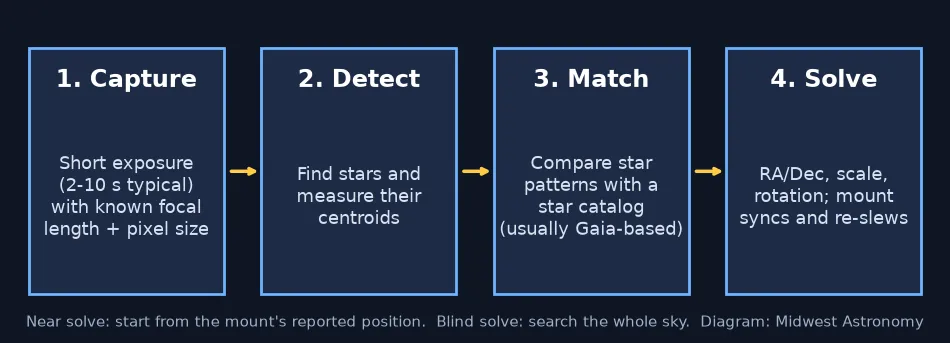
Near solve vs blind solve
- Near solve (hinted): the solver starts from an approximate position (from the mount or the FITS header) and the expected image scale, then searches a limited radius around it. This takes about a second or two on a typical computer.
- Blind solve: no position hint. The solver searches the whole sky, and sometimes a range of image scales. It is slower, but it rescues you when the mount is lost after a bad alignment or when you load an old image with no metadata.
Capture programs usually let you choose a primary solver for near solves and a blind solver as a fallback. N.I.N.A.’s documentation recommends ASTAP as the primary solver and lets you set a separate blind solver that is used by the Framing Assistant and whenever the primary solve fails.
What plate solving is used for
- GoTo centering. Slew, take a short exposure, solve, sync the mount to the solved position, re-slew. Repeat until the error is under your tolerance. This is the “slew and center” step in N.I.N.A. and the “GoTo” plus auto-center in ASIAIR.
- Framing and rotation. Plan a composition in a framing tool, then let solving put the target exactly there, including camera angle if you have a rotator or rotate by hand.
- Multi-night projects. Solve one of last night’s frames and center on that exact position, so new data lines up with the old.
- Meridian flips. After the flip, solving re-centers the target before imaging resumes.
- Polar alignment. Three-point routines (such as N.I.N.A.’s TPPA plugin, SharpCap Pro and ASIAIR’s tool) solve frames at different RA positions to measure the mount’s axis error. See our polar alignment guide.
- Processing. Siril’s and PixInsight’s photometric and spectrophotometric color calibration tools need a plate-solved image, and solving makes annotation and mosaic assembly possible. Our stacking software comparison covers where solving fits into each workflow.
Image scale and field of view: get these right first
Every hinted solver needs to know roughly how large the image is on the sky. Two formulas cover it:
- Image scale (arcsec/pixel) = 206.265 x pixel size (microns) / focal length (mm)
- Field of view (arcminutes) = 3438 x sensor dimension (mm) / focal length (mm)
Example: an APS-C sensor 23.5 mm wide at 400 mm focal length covers about 202 arcminutes, or 3.4 degrees, across. With 3.76-micron pixels the scale is about 1.94″/px.
Use your effective focal length. A 0.8x reducer on a 500 mm scope makes it 400 mm, and binning 2×2 doubles the effective pixel size. Getting either wrong is the most common reason for a failed solve.
The main solvers compared
| Solver | Cost | Runs on | Catalog / index | Strengths | Watch out for |
|---|---|---|---|---|---|
| ASTAP | Free | Windows, macOS, Linux | Local star databases (D05, D20, D50, D80; W08 for very wide fields) | Very fast near solves, offline, integrates with most capture software | Pick the database that matches your field of view |
| Astrometry.net (nova web service) | Free | Browser or API | Hosted index files | Robust blind solving with no install | Needs internet and an API key in capture software; slower |
| Astrometry.net (local, solve-field / ansvr) | Free | Linux, macOS; Windows via ansvr or WSL | 4100 and 5200 series index files | Excellent blind solving offline | Must download index files matched to your image scale |
| PlateSolve 3 (PlaneWave) | Free | Windows | Bundled UCAC4- and Gaia-derived catalogs | Strong at long focal lengths and star-poor fields | Large download; Windows only |
| ASIAIR built-in | Included | ASIAIR Plus / Mini | Internal | Zero setup | Only inside the ASIAIR ecosystem |
| Siril built-in | Free | Windows, macOS, Linux | Online or local catalogs; optional local astrometry.net | Built into processing; distortion terms for color calibration | A processing tool, not a capture-time solver |
ASTAP
ASTAP (the Astrometric STAcking Program by Han Kleijn) is the default recommendation for capture-time solving. It is free, runs offline on Windows, macOS and Linux, and solves a typical hinted frame very quickly. Version 2026.11.12 is current; recent releases added multi-threading for blind solving and improved solving of star-poor images.
The one decision is the star database. ASTAP’s current databases are limited by star density rather than magnitude: D05, D20, D50 and D80 hold up to 500, 2,000, 5,000 and 8,000 stars per square degree. ASTAP’s documentation says any of them works for fields of 0.6 degrees or larger; for smaller fields use the denser D50 or D80. D80 is about 1.25 GB and has no drawback beyond size. For very wide camera-lens fields there is a separate W08 wide-field database. The older H17, H18, V17, G17 and G18 databases can be removed.
Astrometry.net
Astrometry.net is the project that popularized blind solving. The nova.astrometry.net web service is free: upload an image and get a solution, annotations and a WCS file back. Capture programs can use it through an API key, which works but depends on internet access and is slower than a local solver.
The same code can run locally (solve-field on Linux and macOS, or the ansvr local server on Windows). Local use needs index files, named index-41XX (Tycho-2 based) and index-52XX (Gaia based), each covering a range of “skymark” sizes. The project’s guidance is to download index files whose skymarks span roughly 10 to 100 percent of your image width. For a 1-degree field, that means about 5203-5206 and 4107-4109.
PlateSolve 2 and 3
PlaneWave’s PlateSolve 3 is free, Windows-only and particularly good with long focal lengths and small, star-poor fields, such as SCTs and RCs. It comes as a large package with its own UCAC4- and Gaia DR2-derived catalogs. N.I.N.A. supports it alongside the older PlateSolve 2.
Built-in solvers
ASIAIR handles solving internally with no catalogs to install. SharpCap works with external solvers (ASTAP is the common choice). Siril has its own solver, run from Tools > Astrometry > Image Plate Solver or the platesolve command; it can use online or local catalogs or call a local astrometry.net install, and can fit distortion polynomials up to fifth order.
Setting up plate solving in N.I.N.A. with ASTAP
N.I.N.A. is a good example because its options mirror what other programs ask for. The same inputs apply to SharpCap or any ASCOM-based setup.
- Install ASTAP and one star database. Download the installer and the D50 or D80 database from the ASTAP site. Install both into the default folder.
- Enter focal length and pixel size. In N.I.N.A., Options > Equipment: set the telescope focal length (effective, including reducers) and confirm the camera’s pixel size.
- Choose solvers. Options > Plate Solving: set ASTAP as the plate solver and point N.I.N.A. to the ASTAP executable. Set a blind solver (ASTAP itself, or astrometry.net) and leave “use blind solver for failures” on unless you have a reason not to.
- Set the solve exposure. Start with 2-5 seconds for a broadband filter or a color camera and 5-10 seconds through narrowband filters. Binning 2×2 speeds downloads and reduces noise without hurting the solve.
- Set tolerances. Pointing tolerance in arcminutes (1 arcminute is a sensible start) and a number of attempts (2-3).
- Check time and location. The computer clock, time zone and site coordinates must be right, and the mount must agree with them.
- Test it. Point the mount anywhere with stars, take a frame in the Imaging tab and run a solve, or use the Framing Assistant with “Slew and center.” A solve that completes in seconds with a sensible image scale means everything is set.
Why plate solves fail, and how to fix them
Work down this list in order; the first items cause the vast majority of failures.
- Wrong focal length or pixel size. Recheck reducers, Barlows and binning. Compare the scale the solver reports on a successful blind solve with what you entered.
- Too few stars. Lengthen the solve exposure, remove a narrowband filter for the solve if your filter wheel allows, or bin 2×2. Through 3 nm filters, short frames may show only a handful of stars.
- Bad focus or dew. Bloated, faint stars are hard to centroid. Refocus, and check optics for dew; our dew heater guide covers prevention. For focus, see our guide to the Bahtinov mask.
- Wrong database or index files. A field narrower than about 0.6 degrees with ASTAP’s D05 or D20 database, or astrometry.net index files that do not cover your scale, will fail.
- Search radius too small. If the mount is far off (after a power cycle or bad alignment), the target may be outside the near-solve radius. Let the blind solver run once, sync, then return to near solves.
- Hot pixels counted as stars. Uncooled sensors on warm nights can produce enough hot pixels to confuse star detection. Binning or a dark frame helps; see our guide to calibration frames.
- Clouds, haze or bright Moon. Thin cloud can leave enough stars to see visually but not enough to solve. Wait it out or use longer solve exposures.
- Wrong time, date or site. The solve itself may succeed, but the mount sync lands in the wrong place. Fix the clock and coordinates in both software and mount.
- Mirrored images. Some optical trains (or software settings) flip the image. Most solvers detect parity automatically; if centering goes the wrong way, check flip settings.
Plate solving on star trackers and smart telescopes
You do not need a GoTo mount to benefit. With a star tracker, you can upload a test frame to nova.astrometry.net or solve it in ASTAP to see exactly what you framed and how far to move. Smart telescopes such as the Seestar S50 plate solve internally on every target; that is why they can find objects with no star alignment. Our comparison of smart telescopes vs traditional rigs covers what that automation costs you in flexibility.
Hardware that helps
A plate solver needs a camera, a computer or controller and a mount it can command. Common combinations:
- A Windows mini PC or laptop running N.I.N.A. or SharpCap with ASTAP.
- A dedicated controller such as the ZWO ASIAIR Plus, which includes solving.
- A GoTo mount with USB or Wi-Fi control, from the Star Adventurer GTi up to a full equatorial mount.
Frequently asked questions
Plate solving is the automatic identification of where an image points on the sky. Software detects the stars in a frame, matches their pattern to a star catalog and returns the center coordinates, image scale and rotation, which capture software uses to sync and center the mount.
For capture-time solving, ASTAP is the usual first choice: free, fast, offline and supported by most capture software. Astrometry.net is excellent for blind solving, PlateSolve 3 is strong at long focal lengths, and ASIAIR and Siril have their own built-in solvers.
ASTAP's documentation says D05, D20, D50 or D80 all work for fields of view of 0.6 degrees or larger. For smaller fields choose D50 or D80. D80 is the largest at about 1.25 GB, and the separate W08 database is intended for very wide camera-lens fields.
The most common causes are a wrong focal length or pixel size (often a forgotten reducer or binning), too few stars from a short or narrowband exposure, poor focus or dew, the wrong star database for your field of view, or a mount that is too far off for a near solve.
No, unless you use the online astrometry.net service. ASTAP, PlateSolve 3, local astrometry.net, ASIAIR and Siril with local catalogs all work offline, which is important at dark sites with no cell signal.
Usually 2-5 seconds with a color camera or broadband filter and 5-10 seconds through narrowband filters, often binned 2×2. You need a few dozen clearly detected stars, not a pretty image.