
Quick answer: For most beginners, Siril is the best astrophotography stacking software to start with: it is free, open source, runs on Windows, macOS and Linux, and handles calibration, stacking, gradient removal, color calibration and stretching in one program. DeepSkyStacker is the simplest free stacker if you only want a stacked file to edit elsewhere. Astro Pixel Processor is a paid, beginner-friendly all-rounder that shines with mosaics and multi-night data. PixInsight is the paid professional standard, with the most powerful tools and the steepest learning curve.
As an Amazon Associate, Midwest Astronomy earns from qualifying purchases.
Stacking is where astrophotography turns from “a lot of noisy frames” into an image. It aligns dozens or hundreds of exposures, rejects satellites and hot pixels, and averages the rest so the signal grows faster than the noise. Each program below does that well. Where they differ is everything around it: calibration, gradient removal, color, stretching and how much control you get.
Comparison at a glance
| DeepSkyStacker | Siril | Astro Pixel Processor | PixInsight | |
|---|---|---|---|---|
| Cost | Free | Free, open source | Paid (annual “renter” or perpetual “owner” license), 30-day trial | Paid one-time commercial license, 45-day trial |
| Platforms | Windows, macOS, Linux (version 6) | Windows, macOS, Linux | Windows, macOS, Linux | Windows, macOS, Linux |
| Calibration and stacking | Yes | Yes, including scripts for one-click preprocessing | Yes, with strong multi-session handling | Yes, via the WBPP script |
| Gradient removal | Basic | Yes (background extraction; also works with GraXpert) | Yes (light pollution removal tool) | Yes (several processes) |
| Color calibration | Basic | Photometric and spectrophotometric (plate-solved) | Yes, star-based | Photometric and spectrophotometric |
| Stretching and finishing | Basic | Extensive (including Generalized Hyperbolic Stretch) | Good | Most extensive |
| Mosaics | No | Yes | Excellent | Yes |
| Learning curve | Gentle | Moderate | Gentle to moderate | Steep |
| Best for | A quick first stack | Beginners to advanced on a budget | Mosaics, multi-night projects | Maximum control and quality |
Version notes as of late 2026: DeepSkyStacker’s current stable release is 6.2.2, which added macOS and Linux installers; Siril’s latest is 1.4.5 (October 2026); PixInsight’s current release is 1.9.6 “Lockhart”; and Astro Pixel Processor is in its 2.0 beta series. Check each project’s site for newer versions.
DeepSkyStacker: simple and free
DeepSkyStacker (DSS) has been the default first stacker for years. You drag in lights, darks, flats and bias frames, click “Check all” and “Stack checked pictures,” and it produces a 32-bit TIFF or FITS file. It scores frames so you can keep only the best ones, and it offers several rejection methods (kappa-sigma and median kappa-sigma are good defaults).
Strengths: very easy, fast, free, and now cross-platform. Limitations: processing tools after stacking are basic, so you will finish the image in another program (Siril, GIMP, Photoshop or Affinity Photo).
Choose DSS if: you want the easiest possible first stack and plan to edit elsewhere.
Siril: the best free all-in-one
Siril is a free, open-source astronomical image processor maintained by a volunteer team. It covers the full chain: conversion, calibration, registration, stacking, background extraction, plate solving, color calibration, stretching, star separation (via StarNet), deconvolution and noise reduction. Siril 1.4 also added Python scripting, and the 1.4.x maintenance releases keep refining stacking and live stacking.
Its preprocessing scripts are what make it beginner-friendly. If you organize your files into the folders the script expects, one click calibrates, registers and stacks everything.
Strengths: free, powerful, actively developed, scriptable, excellent color calibration. Limitations: the interface takes some learning, and a few advanced tools are less polished than PixInsight’s.
Choose Siril if: you want one free program that can take you from raw files to a finished image, and keep growing with you.
Astro Pixel Processor: friendly power for mosaics
Astro Pixel Processor (APP) is a commercial program from Aries Productions. It is built around a numbered tab workflow (load, calibrate, analyze stars, register, normalize, integrate) that is easier to follow than PixInsight but offers a lot of control. Its multi-session and mosaic handling is a standout, with tools for local normalization that blend panels and nights smoothly. It also includes a capable light pollution removal tool and star-based color calibration.
According to the developer, APP licenses can be activated on up to three computers across any mix of Windows, macOS and Linux, and both license types work offline after activation.
Strengths: mosaics, multi-night data, approachable workflow, strong default results. Limitations: paid; finishing tools are good but not as deep as PixInsight’s.
Choose APP if: you shoot mosaics or combine many nights and want a guided, reliable workflow.
PixInsight: the professional standard
PixInsight from Pleiades Astrophoto is the most powerful and most widely used program among advanced astrophotographers. Its WeightedBatchPreprocessing (WBPP) script handles calibration, subframe weighting, registration and integration in one pass. Version 1.9.6, released in October 2026, added blind plate solving with a local Gaia-based index, a new MultiscaleTGVDenoise process and a new ImageAnalysis process for measuring and weighting subframes.
Many PixInsight users also buy third-party tools such as RC Astro’s BlurXTerminator, NoiseXTerminator and StarXTerminator, which are sold separately.
Strengths: unmatched depth, precise color calibration, enormous community knowledge base. Limitations: paid, steep learning curve, and a different interface logic from typical photo editors. Recommended books like Inside PixInsight help.
Choose PixInsight if: you are committed to the hobby and want the highest ceiling.
What about Photoshop, GIMP and GraXpert?
General photo editors are useful for final touches such as cropping, curves and selective color, but they are not designed for calibration and stacking. GraXpert is a free, open-source tool focused on gradient removal (including an AI-based mode) and denoising, and it pairs well with Siril or DSS.
How stacking actually works (and why calibration matters)
Every stacking program follows the same logic:
- Calibration: subtract master darks (thermal signal and hot pixels), divide by master flats (vignetting and dust), with bias or dark flats removing the camera offset from the flats.
- Debayering for color cameras: converting the Bayer pattern to RGB.
- Registration: detecting stars and aligning every frame to a reference.
- Weighting and rejection: better frames count more; outlier pixels (satellites, planes, cosmic rays) are rejected with sigma-clipping or similar algorithms.
- Integration: averaging the aligned, cleaned frames into one master light.
Noise drops roughly with the square root of the number of frames, which is why doubling your integration time gives a visibly cleaner image, and why four times as much data is needed to halve the noise.
Step-by-step: processing your first image in Siril
This walkthrough uses Siril 1.4 and a one-shot-color camera (DSLR, mirrorless or OSC astro camera). Menu names may shift slightly between versions; the Siril documentation and official tutorials at siril.org are the reference.
Step 1: Organize your files
Create a working folder with four subfolders named exactly:
- lights: your light frames
- darks: darks matching the lights’ exposure, ISO/gain and temperature
- flats: flats shot without changing focus or rotation (a flat field panel makes them quick and repeatable)
- biases: very short exposures with the lens covered (some imagers use dark flats here instead)
Use RAW or FITS files only, not JPEGs. Fast local storage helps; a full session from a modern sensor can run to tens of gigabytes, and a portable SSD such as the Samsung T7 keeps processing quick.
Step 2: Set the working directory
Open Siril, click the home icon, and choose your working folder.
Step 3: Run the preprocessing script
Open Scripts and choose OSC_Preprocessing (or Mono_Preprocessing for a monochrome camera, one filter at a time). Siril converts the files, builds master calibration frames, calibrates and debayers the lights, registers them and stacks them. The result is saved as a FITS file whose name starts with “result” in your working folder.
Step 4: Open the result and switch to Autostretch view
Open the result file. It will look black because the data is linear. Set the display mode at the bottom of the window to AutoStretch to preview it. This only changes the view, not the data.
Step 5: Crop the edges
Draw a selection inside the ragged stacking borders, right-click and choose Crop.
Step 6: Remove the gradient
Open Background Extraction from the Image Processing menu. Generate samples, remove any that land on your target or bright stars, and compute with subtraction. You should see a much more even background. Alternatively, run the image through GraXpert.
Step 7: Plate solve and color calibrate
Use Siril’s astrometry tool to plate solve the image, then run Photometric Color Calibration or Spectrophotometric Color Calibration. These compare your star colors with catalog data to set accurate white balance. Follow with Remove Green Noise if a green cast remains.
Step 8: Optional noise reduction and deconvolution
Light noise reduction and deconvolution work best on linear data. Be conservative; it is easy to make stars look artificial.
Step 9: Stretch
Use Generalized Hyperbolic Stretch for the most control, or the Asinh transformation followed by a histogram adjustment for a simpler approach. Bring up faint detail while keeping the background slightly above black (a pure black background usually looks harsh and hides faint signal).
Step 10: Finishing touches and export
Adjust saturation gently, optionally separate stars with StarNet to process the nebula and stars separately, then save as a 16-bit TIFF for further edits or a PNG or JPEG for sharing.
Monochrome data: the same workflow, three times
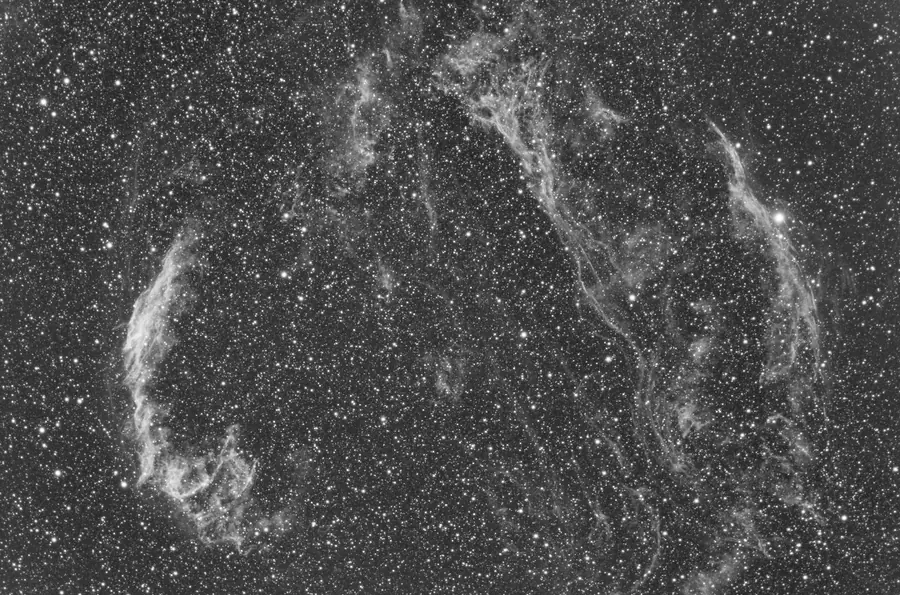
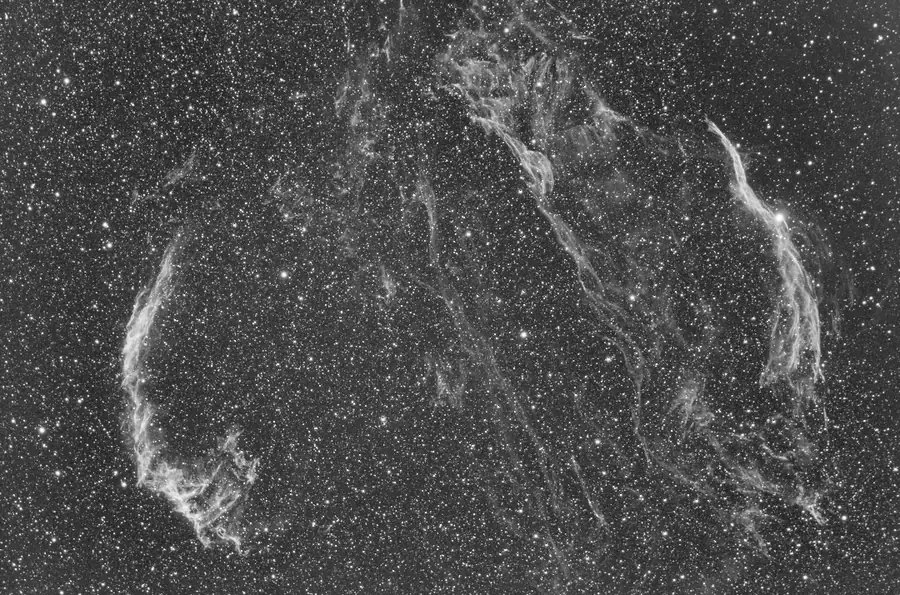
With a mono camera you stack each filter separately (for example H-alpha, oxygen III and sulfur II), then combine them into color. The two stacks above are H-alpha and oxygen III data of the Veil Nebula before combination. They look similar, but the gases are distributed differently, which is what produces the red and blue structure in the finished image at the top of this page. Siril’s RGB composition tool, APP’s combine tools and PixInsight’s ChannelCombination and PixelMath all handle this step.
Our astro camera comparison explains when mono is worth the extra work.
Which should you choose?
- Just starting, zero budget: Siril, or DSS plus a photo editor.
- Want everything in one free tool: Siril.
- Shooting mosaics or many nights per target: Astro Pixel Processor.
- All-in on the hobby: PixInsight, ideally after learning the concepts in Siril.
Whichever you pick, better data beats better software. Clean flats, accurate focus and good tracking will improve your images more than any process. Our troubleshooting guide covers the capture problems that processing cannot fix, and our beginner’s guide covers capture settings. For a deeper understanding of the whole chain, The Deep-sky Imaging Primer is a widely recommended reference.
Frequently asked questions
Siril is the most complete free option: it calibrates, stacks, removes gradients, color calibrates and stretches in one program on Windows, macOS and Linux. DeepSkyStacker is a simpler free stacker if you want to finish your images in another editor.
It can be, but most beginners learn faster starting in Siril or Astro Pixel Processor. PixInsight has the highest ceiling and a free 45-day trial, so many people try it once they understand calibration, stacking and stretching.
Yes. DeepSkyStacker 6 provides installers for Windows, macOS and Linux. Older 4.x versions were Windows only.
Flats are the most important, because vignetting and dust shadows are very hard to remove later. Darks matter most for uncooled cameras and long exposures, and bias or dark flats are needed to calibrate flats correctly.
As many as you can. Noise falls roughly with the square root of the number of frames, so total integration time matters most. One hour is a good minimum for bright targets, and many imagers collect several hours or more per target.
Yes. Stack each filter with the Mono_Preprocessing script, then combine the channels with Siril's RGB composition tool or PixelMath to create palettes such as HOO or SHO.