
Quick answer: A monochrome astro camera with filters produces cleaner, sharper data per hour, especially in narrowband, because every pixel records the filtered light instead of one in four (H-alpha) behind a Bayer matrix. A one-shot color (OSC) camera captures full color in every frame with no filter wheel, so it finishes images on fewer clear nights and is easier to run. Choose OSC for simplicity, galaxies and limited clear skies; choose mono for narrowband, bright suburban skies and maximum quality.
As an Amazon Associate, Midwest Astronomy earns from qualifying purchases.
Our dedicated astro camera vs DSLR guide covers the mono-or-color decision briefly. This article goes deeper: where the efficiency difference actually comes from, how big it is in real numbers, what the workflow costs you in time and complexity, and how to decide based on your sky, your targets and how many clear nights you really get.
The core difference: the Bayer matrix
A color astro camera is a monochrome sensor with a mosaic of tiny color filters laid over the pixels, the Bayer matrix. The most common pattern, RGGB, repeats in 2×2 blocks: one red, two green and one blue pixel. So across the sensor:
- 25% of pixels record red
- 50% record green
- 25% record blue
Software then “debayers” (demosaics) the image, interpolating the two missing colors at every pixel from its neighbors. A monochrome camera has no Bayer matrix. Every pixel records all the light that reaches it, and you choose the color by putting a filter in front of the whole sensor.
That single difference drives almost everything else in this comparison.
Where mono wins big: narrowband
Emission nebulae glow at a few specific wavelengths. The three used most in amateur imaging are:
| Line | Wavelength | Color | Which OSC pixels record it |
|---|---|---|---|
| Hydrogen-alpha (Ha) | 656.3 nm | Deep red | Red pixels only (25%) |
| Oxygen III (OIII) | 500.7 nm | Teal (blue-green) | Mostly green, partly blue |
| Sulfur II (SII) | 671.6 nm | Deeper red | Red pixels only (25%) |
Put an Ha filter in front of a color camera and only the red pixels see meaningful signal. Three-quarters of the sensor records almost nothing useful. Put the same filter in front of a mono camera and every pixel records Ha.
On top of that, each color pixel’s tiny filter absorbs some light even at its own wavelength, so peak sensitivity is lower. For the popular Sony IMX571 sensor, ZWO lists a peak quantum efficiency of 91% for the monochrome ASI2600MM Pro and 80% for the color ASI2600MC Pro (as of November 2026). Combine the Bayer pixel fraction with the lower per-pixel efficiency and mono collects several times more Ha signal per hour from the same sensor.
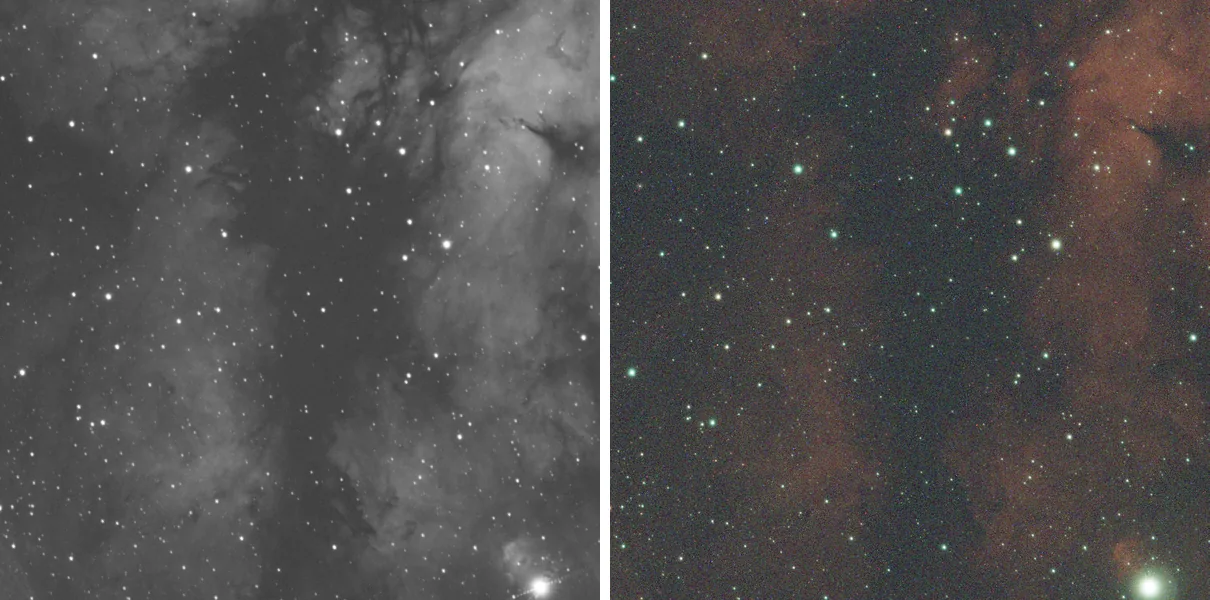
The comparison above is from our first pictures with a monochrome camera post: single 6-minute subs of the same field near Sadr on the same night. The left frame is from an ASI2600MM Pro with an H-alpha filter, the right from an ASI533MC Pro with an Optolong L-eXtreme dual-band filter. The mono frame shows far smoother, more detailed nebulosity in a single exposure. Stacking narrows the gap but does not close it.
Where OSC holds its own: broadband targets
For galaxies, star clusters and reflection nebulae, the light is broadband (continuous across the spectrum). Here the gap shrinks, for two reasons:
- With mono, you shoot red, green and blue separately, so each filter blocks roughly two-thirds of the visible spectrum. Each color channel gets only its share of the night, just as OSC pixels do.
- Mono imagers recover most of their advantage through luminance (L) frames: an unfiltered (UV/IR-cut only) channel that records all visible light on every pixel and carries the detail. A typical LRGB split spends a large share of total time on L and less on each color.
In practice, LRGB with mono still edges out OSC on detail and signal-to-noise, but the difference is modest compared with narrowband, and OSC finishes a galaxy image with far less management.
Resolution and sampling
Debayering interpolates color, so an OSC image has slightly less true resolution than a mono image from the same sensor, especially in the red and blue channels, which are sampled at only one pixel in four. With small modern pixels (3.76 µm on IMX571 and IMX533 sensors) and typical seeing, this matters less than it once did: the atmosphere often blurs detail more than the Bayer pattern does. Mono’s resolution edge shows most on long focal lengths and in excellent seeing.
Mono cameras also bin cleanly. Binning 2×2 combines four pixels into one larger pixel for better signal at the cost of resolution, which is useful for color channels in LRGB or for oversampled setups. With OSC, binning mixes colors and is rarely useful before debayering.
The clear-night math
This is the argument for OSC that matters most in the Midwest, where clear, moonless, transparent nights are limited and often interrupted by cloud.
With OSC, every exposure contains all colors. If you get two clear hours on a target, you have a complete (if noisy) color image after two hours.
With mono, those two hours are split across three to four filters. Narrowband targets often need many hours per filter for clean results. A typical project looks like this:
| Project | OSC (with or without dual-band filter) | Mono |
|---|---|---|
| Bright emission nebula, bicolor | One channel set; 6-10 h typical | Ha + OIII; time split across 2 filters |
| Faint nebula, full SHO palette | Not practical; dual-band at best | Ha + OIII + SII, often 15-30 h total |
| Galaxy in natural color | One set of frames; 6-12 h typical | L + R + G + B, often 10-20 h total |
| Multi-night project | All nights add to one stack | Each night adds to one or more filters |
| Moonlight | Dual-band helps; broadband suffers | Shoot Ha/SII under the Moon, OIII and RGB when dark |
The last row is mono’s hidden advantage: narrowband filters let you image on moonlit nights that would be wasted for broadband. Ha and SII tolerate the Moon better than OIII, so mono imagers schedule filters around the lunar phase. That can turn a monthly window of a week or so into most of the month.
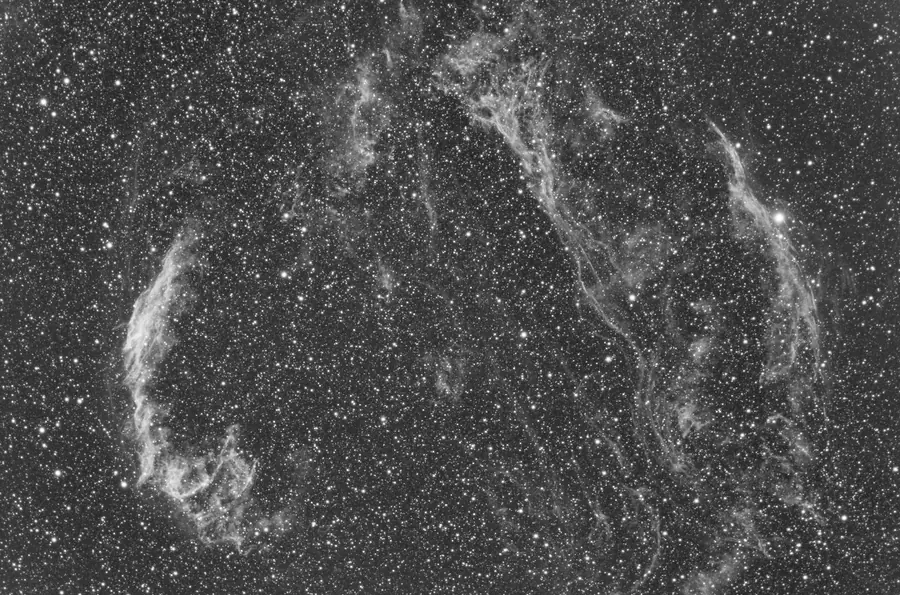
The Veil Nebula image at the top of this page, from the same post, used narrowband filters on a mono camera and took 18 hours over four nights under Bortle 7 skies in northwest Iowa. The time was split almost evenly: 62 six-minute Ha subs, 60 OIII and 58 SII, with the filter wheel changing filters after every exposure so each channel got similar sky conditions. That is the kind of result that makes narrowband mono worthwhile in light-polluted skies, and also a fair picture of the time it takes. Preprocessing also has to be done three times, once per filter, where an OSC camera needs it once.
Dual-band filters: OSC’s narrowband shortcut
Dual-band filters pass two narrow windows, around Ha and OIII, and block nearly everything else. With an OSC camera, the red pixels record Ha and the green and blue pixels record OIII, so you get a bicolor narrowband image in a single exposure.
Examples (specs from Optolong, as of November 2026):
- Optolong L-eXtreme: 7 nm bandpasses at Ha and OIII; a common choice for OSC imagers in light-polluted skies.
- Optolong L-Ultimate: 3 nm bandpasses for more contrast; Optolong notes it is not suited to very fast focal ratios.
- Optolong L-eXtreme F2: a version designed for f/2-f/3.3 systems such as RASA and HyperStar.
A good OSC-plus-dual-band setup delivers convincing HOO-style images from suburban skies. It cannot separate SII, and it still uses only a fraction of the sensor for each line, but it is the best value path into narrowband.
Building color from mono channels
Mono’s flexibility shows in how you assign channels to colors:
- LRGB: luminance for detail, red, green and blue for color. Natural-looking galaxies and clusters.
- HOO (bicolor): Ha mapped to red, OIII to green and blue. Natural-ish red and teal nebulae.
- SHO (Hubble palette): SII to red, Ha to green, OIII to blue, producing gold and blue images.
- HaRGB / HaLRGB: RGB or LRGB color with Ha blended into the red channel to boost nebulae in galaxies.
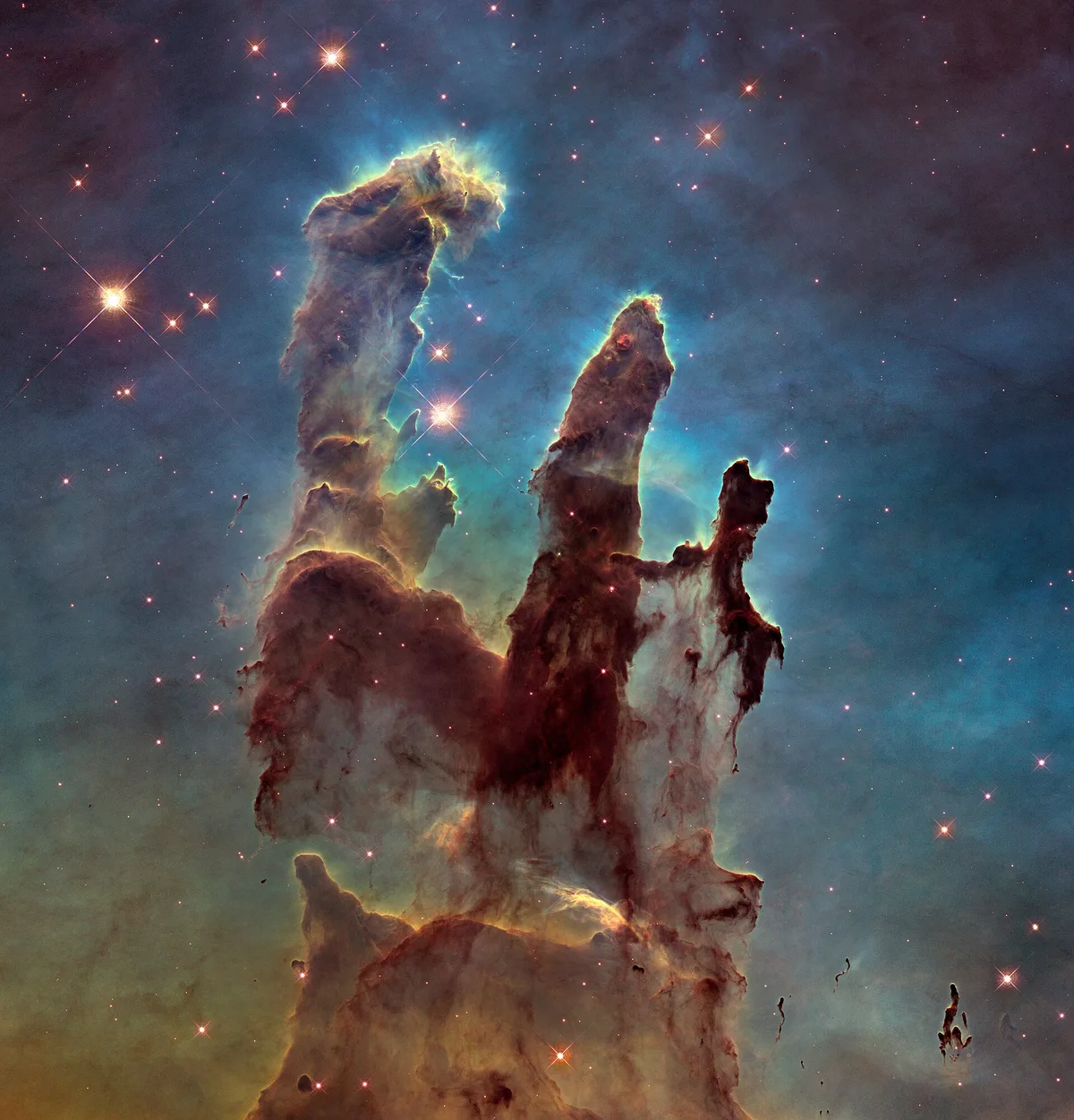
The Hubble palette got its name from images like the Pillars of Creation, where narrowband data for sulfur, hydrogen and oxygen were mapped to color channels. The Veil image at the top of this page follows the same principle: the H-alpha stack shown earlier was combined with matching OIII and SII data from the same mono camera.
Siril (free) handles channel combination with its RGB composition tool and PixelMath; PixInsight (paid) offers ChannelCombination, PixelMath and LRGBCombination. See our stacking software comparison for the full workflow.
What mono adds to your rig and routine
Mono is not just a different camera; it is a different system:
- Filter wheel or drawer: usually an electronic filter wheel such as the ZWO 7-position EFW.
- Filters: L, R, G, B plus Ha, OIII and SII. Filter size must match the sensor and focal ratio. APS-C sensors typically need 36mm unmounted or 2-inch filters to avoid vignetting, while smaller sensors can use 1.25-inch.
- Per-filter flats: dust shadows differ between filters, so you need flats for each one.
- Focus offsets: filters may not be perfectly parfocal. Autofocus per filter, or measure offsets once and let N.I.N.A. or ASIAIR apply them.
- Sequencing: capture software must rotate filters, often by target altitude or Moon phase.
- Processing: register all channels to one reference, then combine. More steps, more control.
None of this is hard once it is automated, but it is more to learn and more to go wrong on a cold night.
Matched mono and color pairs
Many sensors come in both versions, so you can compare like for like:
| Sensor | Format | Pixel size | Mono example | Color example |
|---|---|---|---|---|
| Sony IMX571 | APS-C, 26 MP | 3.76 µm | ZWO ASI2600MM Pro, Player One Poseidon-M Pro, QHY268M | ZWO ASI2600MC Pro, Player One Poseidon-C Pro, QHY268C |
| Sony IMX533 | 1-inch square, 9 MP | 3.76 µm | ZWO ASI533MM Pro | ZWO ASI533MC Pro |
Specs vary by model generation; check the manufacturer page for the version you are buying. As of November 2026, ZWO’s current ASI2600 Pro listings show a 16-bit ADC, 3.76 µm pixels and 6248 × 4176 resolution for both versions.
Which should you buy?
Choose one-shot color if:
- This is your first dedicated astro camera.
- You get few clear nights and want finished images from short windows.
- You mostly image galaxies, clusters and reflection nebulae from reasonably dark skies.
- You want a simpler rig, one set of flats, and less time configuring sequences.
- You plan to add a dual-band filter for emission nebulae from light-polluted skies.
Choose mono if:
- You image from bright suburban or city skies and love emission nebulae.
- You want true SHO images or the ability to work through moonlit nights.
- You are comfortable with automation software and longer projects.
- You want the most detail and signal per hour your telescope can deliver.
A common path is to start with OSC, learn guiding, focusing and processing, then add a mono camera later. Many imagers keep both, using OSC for star color and galaxies and mono for narrowband.
Budget tiers, without fixed prices:
- Starter: a small-sensor OSC camera such as an IMX533 or IMX585 model, with a dual-band filter.
- Mid: an APS-C OSC camera, or a small-sensor mono camera with a compact filter wheel and 1.25-inch filters.
- Advanced: an APS-C mono camera with a 7-position wheel and 36mm or 2-inch LRGB and narrowband filters.
Remember to budget for the filters and wheel when pricing mono. Together they can cost as much as the camera itself.
The bottom line
Mono is the more efficient detector, and in narrowband the advantage is large. OSC is the more efficient system for most people’s real-world nights: fewer parts, fewer frames to manage, and a color image from every clear hour. Match the camera to your sky, your targets and your patience, and either one can produce outstanding images. If something goes wrong once you are set up, our astrophotography troubleshooting guide covers the common problems.
Frequently asked questions
A one-shot color camera is usually better for beginners. It needs no filter wheel, uses one set of calibration frames, and produces a color image from every exposure, so you finish projects faster while learning guiding, focus and processing.
Behind an H-alpha filter, only the red pixels of a color camera (one in four) record useful signal, and those pixels have lower peak sensitivity because of their color filters. A mono camera records the filtered light on every pixel, so it gathers several times more H-alpha signal per hour from the same sensor.
Yes. Dual-band filters such as the Optolong L-eXtreme or L-Ultimate pass H-alpha and OIII together, letting a color camera produce bicolor narrowband images. It cannot isolate SII and is less efficient than mono, but it works well from light-polluted skies.
Total integration is similar or shorter for the same quality, but it is split across several filters, so a mono image is not complete until every channel has enough data. OSC gives a complete color image from each session.
For broadband color you need luminance, red, green and blue filters. For narrowband add H-alpha, OIII and SII. Choose a size that suits your sensor: 1.25-inch for small sensors, 36mm unmounted or 2-inch for APS-C and larger.
Color cameras interpolate missing colors at each pixel during debayering, which slightly reduces resolution, especially in red and blue. In average seeing the difference is small; it is most visible at long focal lengths under steady skies.