
Quick answer: Bad guiding in PHD2 usually comes from one of five things: poor seeing being “chased,” an old or bad calibration, declination backlash, mechanical problems (balance, cables, flexure, periodic error), or a weak or saturated guide star. Run the Calibration Assistant and Guiding Assistant first, switch the graph to arcseconds, then match the pattern: fast random spikes mean seeing, slow waves mean periodic error, and Dec stalls before reversing mean backlash. Fix mechanics before touching algorithm settings.
As an Amazon Associate, Midwest Astronomy earns from qualifying purchases.
Guiding problems are frustrating because the symptoms overlap. A wobbly graph might be the atmosphere, the mount, the settings or the guide camera, and changing settings at random usually makes it worse. This guide is a troubleshooting companion to our PHD2 guiding tutorial. It assumes PHD2 is installed and guiding, and focuses on diagnosing and fixing what goes wrong. Menu names refer to PHD2 v2.6.14, the current release as of November 2026.
Step 0: Make sure the guiding really is bad
Before you fix anything, confirm there is a problem worth fixing.
- Switch the graph to arcseconds. Pixel units vary with guide camera and focal length; arcseconds let you compare with your imaging scale.
- Calculate your imaging scale: 206.265 × pixel size (µm) ÷ imaging focal length (mm).
- Compare total RMS with that scale. A common target is total RMS at or below about half the imaging scale. At 2″/px, 1″ RMS is fine; at 0.8″/px, you need about 0.4″.
- Check your subs, not just the graph. If stars are round in the images, the guiding is good enough, whatever the graph looks like.
- Watch for at least 10 minutes. Two minutes of data is mostly a measurement of the seeing at that moment.
If stars are elongated but RMS is good, the problem is probably not guiding at all. Differential flexure, tilt, spacing or a sagging focuser are the usual suspects; see our guide to fixing elongated stars.
Step 1: Recalibrate properly
A large share of guiding complaints trace back to calibration. A bad or outdated calibration makes PHD2 send the wrong size or direction of correction, which looks like oscillation, slow recovery or runaway drift.
- Calibrate near the celestial equator and close to the meridian, where RA movements are easiest to measure. PHD2’s documentation recommends this area for both calibration and Guiding Assistant measurements.
- Use the Calibration Assistant (added in v2.6.12, Tools → Calibration Assistant). With an ASCOM or INDI mount connection it proposes a slew to near Dec 0 and about 5° east or west of the meridian, pre-clears Dec backlash, then sanity-checks guide speed and calibration step size, and grades the result as good, acceptable or poor. If it says the mount guide speed is too low, raise it to at least 0.5x sidereal in the mount driver or hand controller.
- Connect the mount through ASCOM or INDI rather than an ST-4 cable when possible. PHD2 then knows the declination and pier side and can adjust the calibration after slews and meridian flips.
- Recalibrate after hardware changes: a different guide camera, binning, guide scope, a rotated camera, or a new mount configuration.
- Click Explain when the result is less than good. Orthogonality errors (RA and Dec axes not close to 90° apart) and unexpected rates usually point to backlash during calibration, a slipping clutch or cable drag.
Step 2: Run the Guiding Assistant and believe it
The Guiding Assistant (Tools → Guiding Assistant) turns off guide output and measures how the star moves on its own. Let it run at least two minutes, and up to ten for good polar alignment and periodic error estimates. Tick Measure Declination Backlash so it finishes with a backlash test.
What the results tell you:
- High-frequency star motion is mainly seeing. PHD2 cannot correct it, and trying to is called chasing the seeing. The GA recommends a minimum-move value to ignore it.
- Polar alignment error shows up as steady Dec drift. A few arcminutes is fine and can even help (see below).
- RA peak-to-peak and maximum rate describe periodic error and other RA irregularities.
- Declination backlash in milliseconds tells you how long the mount takes to respond after a direction reversal.
Apply the recommendations, then change nothing else for 15 minutes so you can judge the effect.
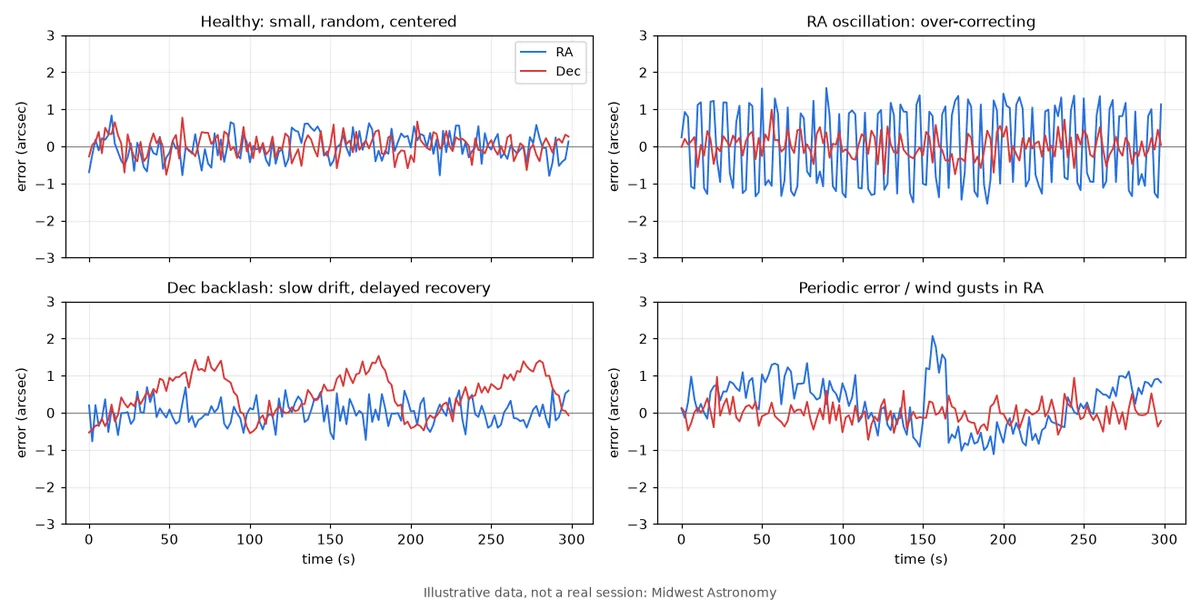
Step 3: Match the graph pattern to the cause
Fast, random spikes in both axes: seeing
Jagged, non-repeating motion of a few tenths of an arcsecond in both RA and Dec is normal turbulence. Fixes:
- Lengthen guide exposures to 2-4 seconds so the centroid averages out the turbulence.
- Leave multi-star guiding on (it has been on by default for new profiles since v2.6.11). Averaging several stars reduces seeing noise.
- Raise minimum move to the GA’s recommendation.
- Accept it. On poor-seeing nights, everyone’s RMS goes up.
Regular back-and-forth in RA: over-correction
If the blue RA line swings across zero in a regular zigzag, each correction is overshooting.
- Lower RA aggressiveness in 10 percent steps (Hysteresis algorithm).
- Check that guide exposure is not too short; sub-second exposures with seeing noise invite oscillation.
- Recheck calibration. A calibration done far from the equator or with backlash in it can make PHD2 think the mount moves less than it does.
- Check the mount’s guide rate matches what PHD2 thinks it is.
Slow, smooth RA waves: periodic error
A wave in RA that repeats every few minutes is periodic error from the worm gear (often one worm rotation) or other drive components.
- Try the Predictive PEC algorithm for RA. It learns repeating error and corrects ahead of time.
- Use the mount’s own PEC training if it has one.
- Make sure RA is slightly east-heavy so the worm stays loaded against the gear.
Dec drifts in one direction with corrections all one way: polar alignment
A steady Dec drift that PHD2 corrects only north (or only south) is polar alignment error. Mild drift is harmless. Large drift wastes correction effort and causes field rotation at the edges of long-focal-length images. Redo polar alignment with your preferred tool; our tutorial on how to polar align covers the options.
Dec stalls, then overshoots: declination backlash
This is the classic PHD2 problem. When PHD2 reverses Dec direction, the worm first has to cross the gap between its thread and the gear teeth. Nothing happens for a while, PHD2 keeps sending pulses, then the mount catches up all at once and overshoots. The graph shows long, one-sided excursions and slow, stair-step recoveries.
Fixing declination backlash
Work through these in order, from mechanical to software.
| Approach | How it works | Best when |
|---|---|---|
| Mechanical adjustment | Reduce worm-to-gear clearance per the mount maker’s instructions | Backlash is large and the mount supports adjustment |
| Slight Dec imbalance | Make the Dec axis slightly front- or back-heavy so the gear stays meshed on one side | Small to moderate backlash on worm mounts |
| One-direction Dec guiding | Set Dec Guide Mode to North or South and let a small polar misalignment drift the star the opposite way | Backlash too large to compensate reliably |
| Backlash compensation | PHD2 adds an extra pulse when Dec reverses, sized from the GA measurement | Backlash is moderate and consistent |
| Accept and dither less in Dec | Reduce Dec reversals, keep dithers small | Small residual backlash after other fixes |
Mechanical first. Many worm-gear mounts have an adjustable worm mesh; follow your manufacturer’s manual and do not overtighten, or the axis will bind and stick. Strain-wave mounts have very little backlash but their own error characteristics, so read their guiding recommendations before copying settings from worm-gear users.
One-direction guiding. In Advanced Settings → Algorithms, set Dec Guide Mode to North or South. Watch which way Dec drifts during the GA, then choose the guide direction that pushes against that drift. Offsetting polar alignment slightly (a few arcminutes) makes the drift reliable. PHD2 temporarily allows both directions while settling after a dither.
Backlash compensation. Enable it in the Dec algorithm settings with the value the GA measured. First disable any backlash compensation in the mount’s own controller or driver, or both the measurement and PHD2’s compensation will be wrong. Per the PHD2 manual, the GA makes no recommendation below 100 ms, and above about 3 seconds it recommends uni-directional Dec guiding instead, because compensating values that large rarely works. Too much compensation causes Dec oscillation; reduce it if Dec starts zigzagging after reversals.
Step 4: Rule out mechanical and setup problems
Settings cannot fix hardware. Check:
- Balance. RA slightly east-heavy; Dec close to balanced with a slight bias. Rebalance after adding a dew heater, focuser or filter wheel.
- Cables. A cable that tugs as the mount tracks produces sudden jumps or slow drifts. Route cables through a loop near the axes and tie them off.
- Clutches. A slipping clutch shows as jumps after slews or uncorrectable drift.
- Wind. Big spikes during gusts. Lower the tripod, extend legs less, add a windbreak or shorten the dew shield.
- Tripod and pier. Soft ground, decks and frozen-then-thawing soil move. Midwest winter imagers will recognize the last one.
- Guide scope flexure. If guiding looks good but stars trail in one direction, the guide scope may be moving relative to the main scope. Tighten rings, use a solid mount, or switch to an off-axis guider at long focal lengths.
- Payload. A mount near its capacity limit guides worse. Lighter optics often fix “bad guiding” on long focal lengths.
Step 5: Fix guide star problems
- Saturated star: the star profile shows a flat top. Pick a fainter star, shorten guide exposure, or lower guide camera gain.
- Low SNR, star lost alerts: focus the guide camera, lengthen exposure, increase gain, or check for dew on the guide scope (our dew heater guide helps here).
- Hot pixels chosen as stars: build a dark library and enable it; PHD2’s minimum HFD setting also helps avoid single-pixel “stars.”
- Clouds: PHD2 will pause or lose the star. Multi-star guiding tolerates thin cloud better than single-star guiding since v2.6.12, but no setting fixes heavy cloud.
Step 6: Use the logs and ask for help effectively
PHD2 writes a guide log and a debug log for every night. The free PHD2 Log Viewer lets you review a whole session, see calibration results, and measure RMS over sections without interruptions like dithers. If you need help, use Help → Upload Log Files and share the link on the Open PHD Guiding forum. Volunteers can diagnose far more from logs than from screenshots.
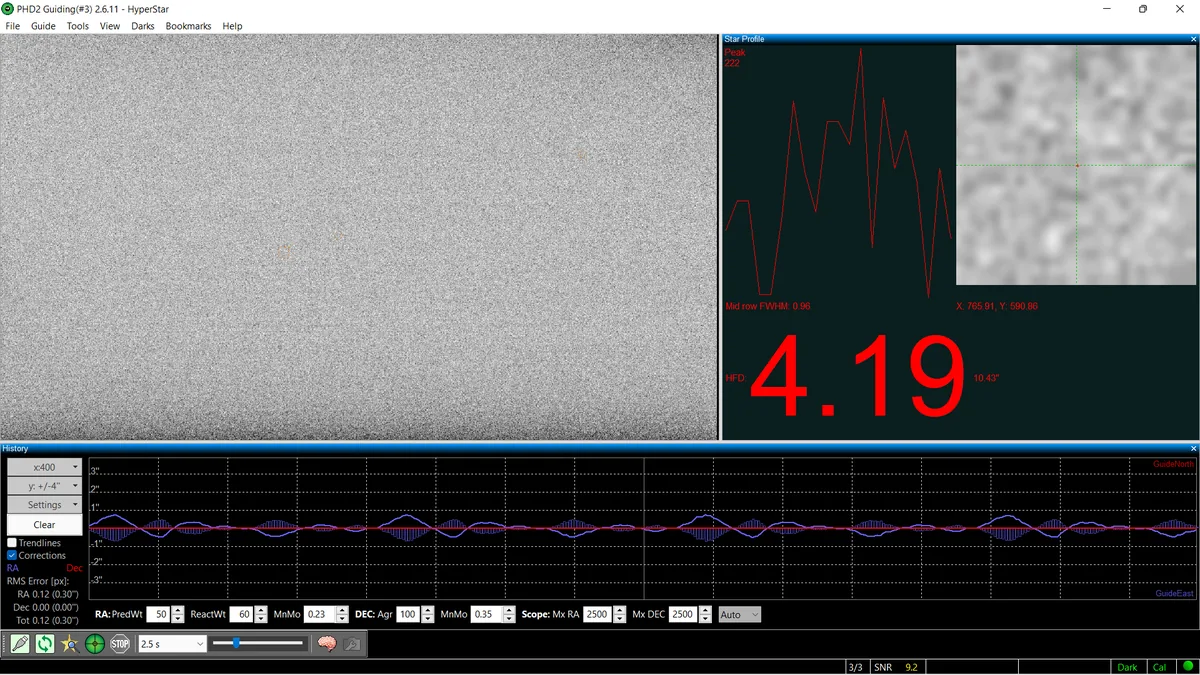
A troubleshooting order that saves nights
- Confirm the problem against your imaging scale and actual subs.
- Check balance, cables, clutches and wind.
- Calibrate near the equator and meridian with the Calibration Assistant.
- Run the Guiding Assistant with backlash measurement and apply its recommendations.
- Match the graph pattern: seeing, oscillation, periodic error, drift or backlash.
- Change one setting at a time and give it 15 minutes.
- Upload logs if you are stuck.
If you are still deciding whether your mount is up to the job, our comparison of star trackers and equatorial mounts explains payload and tracking expectations, and our astrophotography troubleshooting hub covers problems beyond guiding. For hardware, a small guide scope and a monochrome guide camera remain the simplest starting point, and an off-axis guider is the usual fix for flexure at long focal lengths.
Frequently asked questions
Aim for total RMS at or below about half your imaging scale in arcseconds per pixel. With a 2 arcsecond per pixel setup, 1 arcsecond RMS is good; at 0.8 arcseconds per pixel you need about 0.4. Seeing often limits results to between 0.5 and 1 arcsecond.
RA oscillation usually means corrections are too strong. Lower RA aggressiveness in small steps, lengthen guide exposures to 2 to 4 seconds, recalibrate near the celestial equator and meridian, and confirm the mount guide rate matches PHD2's settings.
Start mechanically by adjusting the worm mesh if your mount allows it, then unbalance the Dec axis slightly. If backlash remains, guide Dec in one direction only with a small deliberate polar misalignment, or enable backlash compensation using the value from the Guiding Assistant.
Not necessarily. If PHD2 is connected to the mount through ASCOM or INDI and nothing in the guide setup has changed, it can reuse a calibration. Recalibrate after changing the guide camera, binning, guide scope or camera orientation, or when guiding suddenly gets worse.
Two to four seconds suits most setups. Shorter exposures make PHD2 react to atmospheric seeing, while longer exposures can be too slow for mounts with fast periodic error. Use the Guiding Assistant results to fine-tune.
If the guide graph and RMS are good but stars trail, the cause is usually differential flexure between the guide scope and main scope, tilt, spacing errors or a slipping focuser rather than guiding itself. An off-axis guider eliminates guide scope flexure.